A training run took about twenty-five minutes. The first one, I watched every line of output. The second, I went for coffee. The third, I got coffee, did some emails, noticed training had finished, changed a learning rate, submitted another job, and went for another coffee.
I was about to spend several Saturdays being the human connection between a config file and a terminal.
My rule of three had arrived: do something repetitive twice and perhaps it's cheaper to keep doing it. The third time, "don't repeat yourself" shows up at the door, glaring.
There are established tools for scheduling ML experiments. I wanted to build this one myself. The scheduler was as legitimate a hobby project as the model it would run.
Let the Training Script Describe Itself
The first commit was a design document; the code followed the next day. The system had two pieces: a Flask scheduler storing jobs and results in SQLite, and a worker launching training scripts on the GPU machine.
The worker asks for work, runs one job, reports the result, and asks again. Those requests originate from the worker. Provided it can reach the scheduler, it doesn't need an inbound connection through the home router just to fetch jobs.
The interesting part was who owned the list of settings.
If the dashboard hard-codes learning rate, batch size, and layer count, adding a new training option means editing two applications. I didn't want to maintain an increasingly inaccurate portrait of my training script in JavaScript.
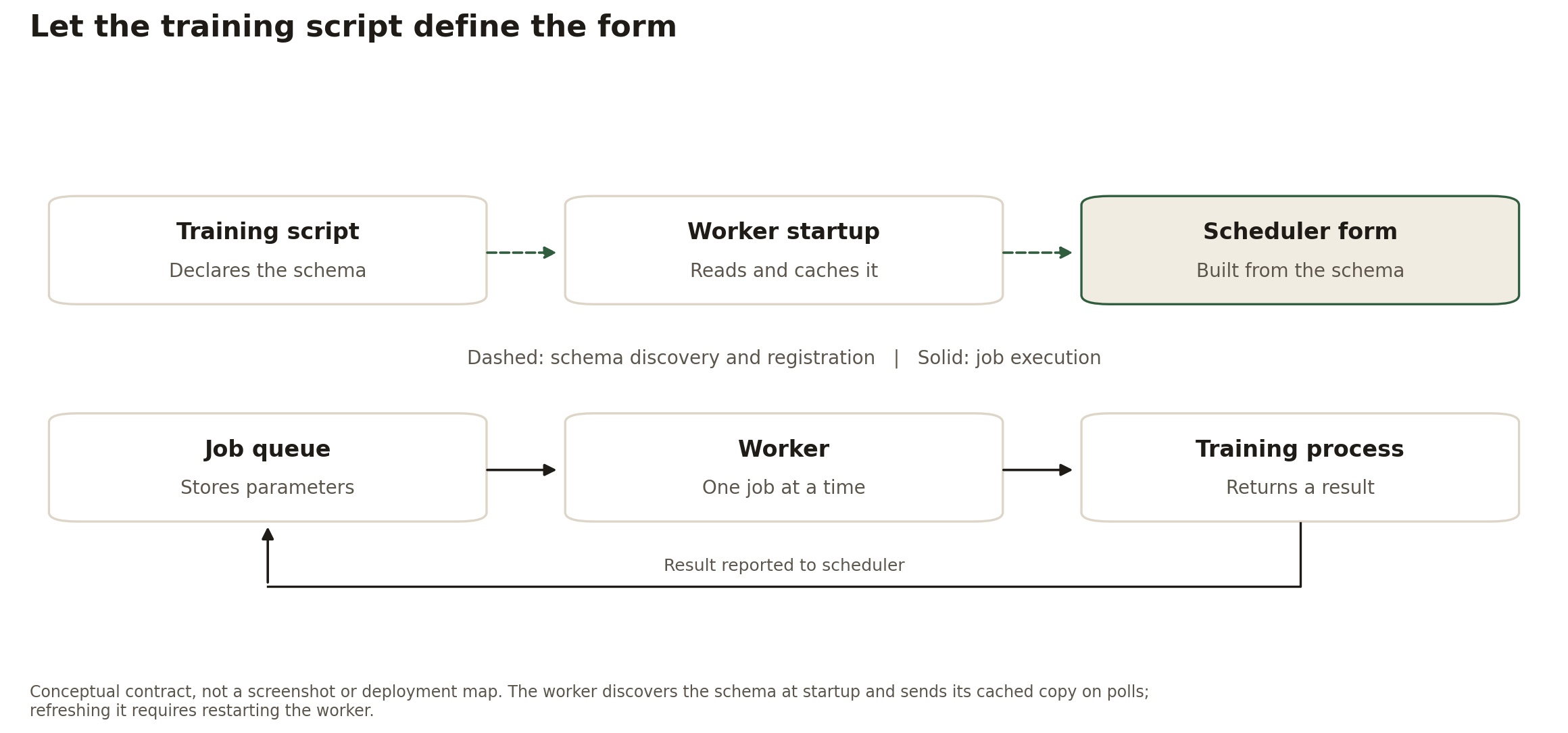
Instead, the script answers --print_schema with JSON. A learning-rate field
can look like this:
{
  "max_lr": {
    "type": "float",
    "default": 0.001,
    "min": 0.0001,
    "max": 0.01,
    "name": "Maximum Learning Rate"
  }
}
The worker discovers that schema at startup and includes it in its polls. The scheduler builds the form from the types, ranges, choices, and labels. To expose a new option, I update the training script and restart the worker so it discovers the change. No scheduler code or deployment needs to change for an option the form renderer already supports.
A changed schema creates a separate dashboard section, identified by the worker name and a hash of the schema. Existing jobs stay attached to their old section; they don't silently migrate to the new queue. That preserves the advertised options, not a complete experiment: it doesn't version the training code or freeze the dataset.
The return trip is similarly small. A successful script prints a marked JSON result among its ordinary logs. The worker extracts it and sends the metrics back. The scheduler doesn't need to know whether those metrics came from Dota heroes or handwritten digits.
What Happens When a Worker Disappears?
I deliberately left automatic recovery out of the first version. If a worker
died, or its completion report failed to arrive, the job could remain marked
IN_PROGRESS. I had to inspect it and reset it to pending myself.
That is less convenient than automatic retry, but it leaves the decision with me: has the old process stopped, or have I merely lost contact with it? Before restarting the work, I need to know which. A missing reply is not proof that nothing is running.
The design assumed one active worker per queue. Assignment was a separate read and update, so two competing copies could select the same pending job. This was enough to stop me submitting every job by hand, not a guarantee that each job would run exactly once.
Cancel was implemented: a background status check noticed the request and terminated the training subprocess. Pause wasn't. The original worker logged a pause request but kept training; there was no working pause/resume mechanism to credit it with.
Failure reports were more useful than an optimistic list of controls. I added error details and captured stderr to the dashboard, because a red badge saying "failed" is not much of a debugging tool. Then came the smaller fixes: preserving form inputs during refreshes, and highlighting values I'd changed from their defaults.
Five Jobs, One After Another
I queued five configurations the first night and went to bed. In the morning, the dashboard held five completed rows with their scores and training times. The worker had processed them sequentially while I slept.
The scheduler hadn't made the model better or the GPU faster. It had removed me from the gap between experiments. I could decide what to compare, submit the work together, and return to the results instead of the terminal prompt.