For years, a single modest cloud instance had hosted my personal projects, from small utilities to my Magic: The Gathering cube analyzer. As I added applications, memory usage climbed. The server was starting to feel like a tiny studio apartment with too much furniture.
This describes the original 2025 setup: a cloud server and a Raspberry Pi, connected through reverse SSH. The arrangement later changed; I've written about giving the cloud server a smaller job in a follow-up.
The Crossroads: To Scale Up or To Scale Out?
The Vertical Path: Rent a Bigger Apartment
The simplest answer was to pay for a larger cloud instance. More memory, little architectural change, and probably the shortest route back to working on my applications. If getting more capacity had been the whole objective, that would have been a perfectly good choice.
The Horizontal Path: Maybe Overkill
Another option was to spread the work across more cloud machines. Replicating applications behind a load balancer is useful when traffic demands it, but my problem was a collection of small applications competing for memory, not a crowd of visitors. A full load-balanced setup felt like hiring a symphony orchestra to play "Happy Birthday."
This was also my personal lab. Keeping the rental bill small mattered, and learning how to connect the machines was part of the point.
My eyes fell upon a Raspberry Pi 4 sitting on a shelf in my closet. I kid you not, it was sitting right there. Spare capacity, already paid for, gathering dust while the cloud server ran short of memory.
And then, a third, slightly unhinged idea began to form. What if I could make them work together?
Digging Secret Tunnels
The challenge was getting requests from the public server to an application on the Pi without opening a new inbound port-forward on my home router.
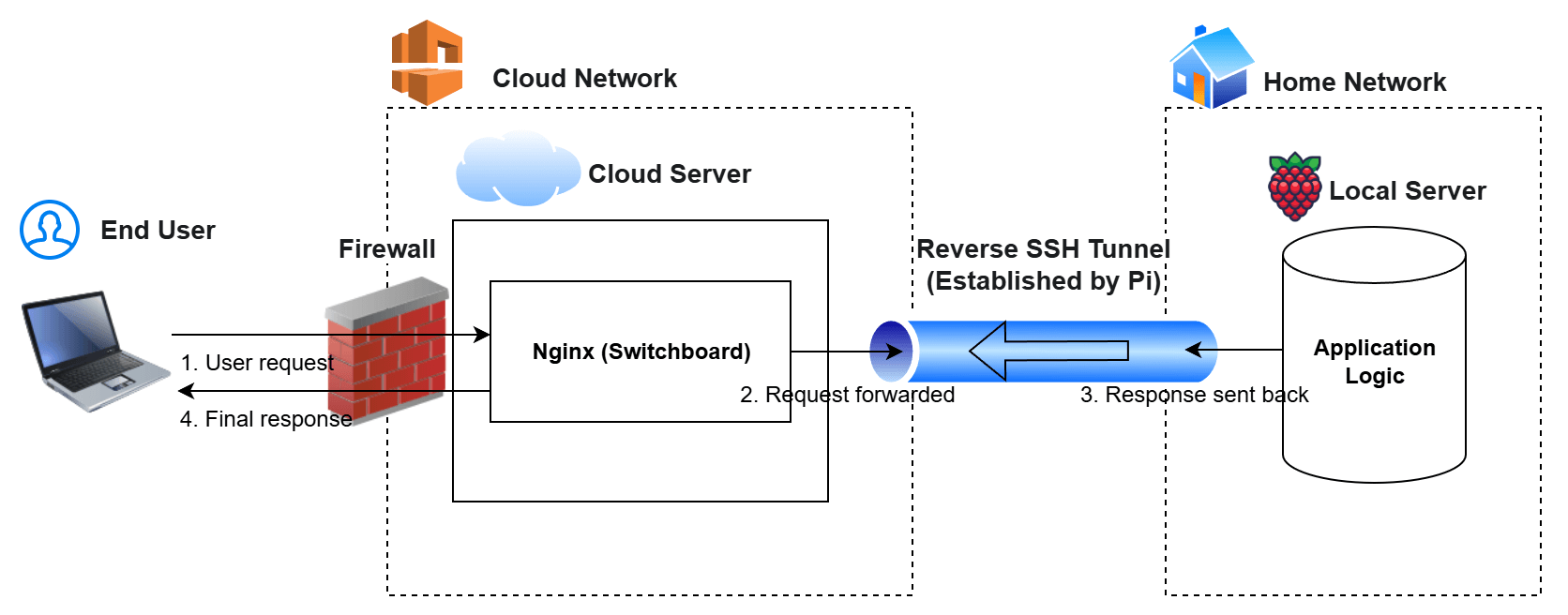
Instead of accepting a new connection at home, the Pi could establish one outward and keep it open. The cloud server could then send application traffic back through that connection.
That's a reverse SSH tunnel. "Reverse" describes how the forwarding is set up, not a restriction on which way data can travel:
- The Pi opens an SSH connection to an account on the cloud server and requests a forwarding listener there.
- The cloud server's Nginx acts as the switchboard. Requests for applications moved to the Pi go to that listener, rather than to an application running on the cloud machine.
- SSH carries those requests back to the Pi, where the application handles them and sends its response through the same connection.
Visitors still use the same public website. Their request just takes a detour through my closet.
Where the Trust Actually Lives
Not adding a router port-forward is a useful property. It is not the same as making the application private or removing the need to secure it.
There are three separate boundaries here:
- The SSH account is on the cloud server. The Pi's credential authenticates it there. Restricting that account limits what the credential can do on the cloud machine; it does not define the permissions of an account on the Pi.
- The forwarding path reaches a service on the Pi. A compromised cloud server can use that path to send requests to the forwarded service and try to exploit it. That is not automatically an SSH login to the Pi, but it is a reason to include the cloud server in the application's threat model. The application still needs its own access controls.
- Loopback is not an Nginx-only permission. A loopback address is for connections on the same machine. Binding the forwarding listener there keeps it off the cloud server's external network interfaces, but other local processes can generally connect too. A broader binding can expose it beyond the host if network rules permit. The bind address still needs to match the intended exposure.
The tunnel changed how requests reached the application. It did not make those requests trustworthy. The useful boundary was avoiding a direct inbound router rule at home, while accepting that the cloud server could reach the forwarded application.
Making Sure Water is Flowing Through the Tunnel
Three pieces kept the arrangement running:
autosshsupervised the SSH connection and attempted to re-establish it after a failure.systemdstarted that process when the Pi booted.- Nginx routed requests to the appropriate application on each side.
The small, latency-sensitive services stayed on the cloud instance. The memory-hungry ones that could tolerate the extra trip ran in my closet.
Takeaways
I got room for more applications without renting a larger cloud instance, and some experience I wouldn't have acquired by moving a slider. That doesn't make it the simpler solution. Simplicity wasn't the only thing I was shopping for.
The cost was a dependency on my home internet and a Pi that was, structurally, in a closet. I left the services that couldn't tolerate that arrangement on the cloud box. Knowing which workloads can tolerate your closet is most of the design.
My metrics dashboard is already giving me ideas for the sequel.